🚀 Day 2: NumPy, Dice & Destiny 🎲

Hello beautiful people 👋
I’m Muni — a DevOps engineer who’s been living in the world of pipelines, deployments, and YAML files.
But lately, everywhere I look — AI, AI, AI! 😅
Everyone’s either training a model, building an agent, or making machines think smarter than my Jenkins server.
So… I decided — enough watching!
It’s time I bring AI into my DevOps world. 💥
And today marks the real beginning of that adventure.
This post is my Day 2 journal — full of experiments, small victories, and happy chaos 😄
🧱 Step 1: Setting the Ground — My Python Lab Setup 🧪
Before I even touched AI, I needed to build a clean playground.
I created a folder called:

This is my “secret AI lab” — where all the magic (and mistakes) happen 😜
Then I created a virtual environment — my own isolated Python bubble:

⚡ Fun fact: A virtual environment is like a personal kitchen.
You can install any ingredient (library), try weird recipes (experiments), and it won’t mess with your neighbor’s dinner (global Python setup). 🍜
Every hero needs a team.
So, I installed the four heroes of data:
💡 These will soon become my daily companions:
🧮 NumPy — for fast number crunching
📊 Pandas — for handling Excel-like data
🎨 Matplotlib — for plotting
🌈 Seaborn — for prettier, high-level visualizations
Then, I saved all of them in a magical scroll called:
pip freeze > requirements.txt
requirements.txt = a recipe book for your Python setup.
Tomorrow, if I switch laptops, I can just do:
pip install -r requirements.txt
and my environment will be cloned perfectly. Chef’s kiss 👩🍳✨
🧠 Step 2: Enter NumPy — The Math Magician
If Python lists are cute puppies 🐶,
then NumPy arrays are trained military robots 🤖 —
fast, powerful, and efficient.
I met NumPy for the first time like this:
import numpy as np

arr = np.array([1, 2, 3, 4, 5])
print("Array:", arr)
print("Shape:", arr.shape)
print("Data Type:", arr.dtype)
NumPy replied calmly:
Array: [1 2 3 4 5]
Shape: (5,)
Data Type: int32
And that was the moment I realized —
this isn’t your regular Python.
This is science 😎
🧮 Step 3: Playing with NumPy Like a Pro
Once I got comfortable, I played around a bit:
print(arr + 5)
print(arr * 2)
print(np.sqrt(arr))
print(np.mean(arr))
No loops. No fuss.
Just one line, and NumPy did all the math.
In my DevOps world, I’d call that automation with elegance. 😌
🎲 Step 4: My First Mini Project — Dice Simulator 1000X!
Now that I had my new powers, I wanted to do something fun!
So I thought — what if I roll a dice 🎲 1000 times and check if it’s fair?
And boom 💥 my first AI/ML mini project was born.
Here’s the full code:
import numpy as np

# Simulate rolling a dice 1000 times
rolls = np.random.randint(1, 7, 1000)

# Count how many times each face appears
unique, counts = np.unique(rolls, return_counts=True)

# Display results
for face, count in zip(unique, counts):
    print(f"Face {face}: {count} times")

# Probability of each face
probabilities = counts / 1000
print("\nProbabilities:")
for face, prob in zip(unique, probabilities):
    print(f"Face {face}: {prob:.2f}")
📜 The Story Behind The Code
I told the computer:
“Roll this dice 1000 times for me.”
It obeyed — generating 1000 random numbers between 1 and 6.
Then, I used np.unique(..., return_counts=True) to count how often each number appeared.
Finally, I divided each count by 1000 to get the probability of each face.
The output looked like this:
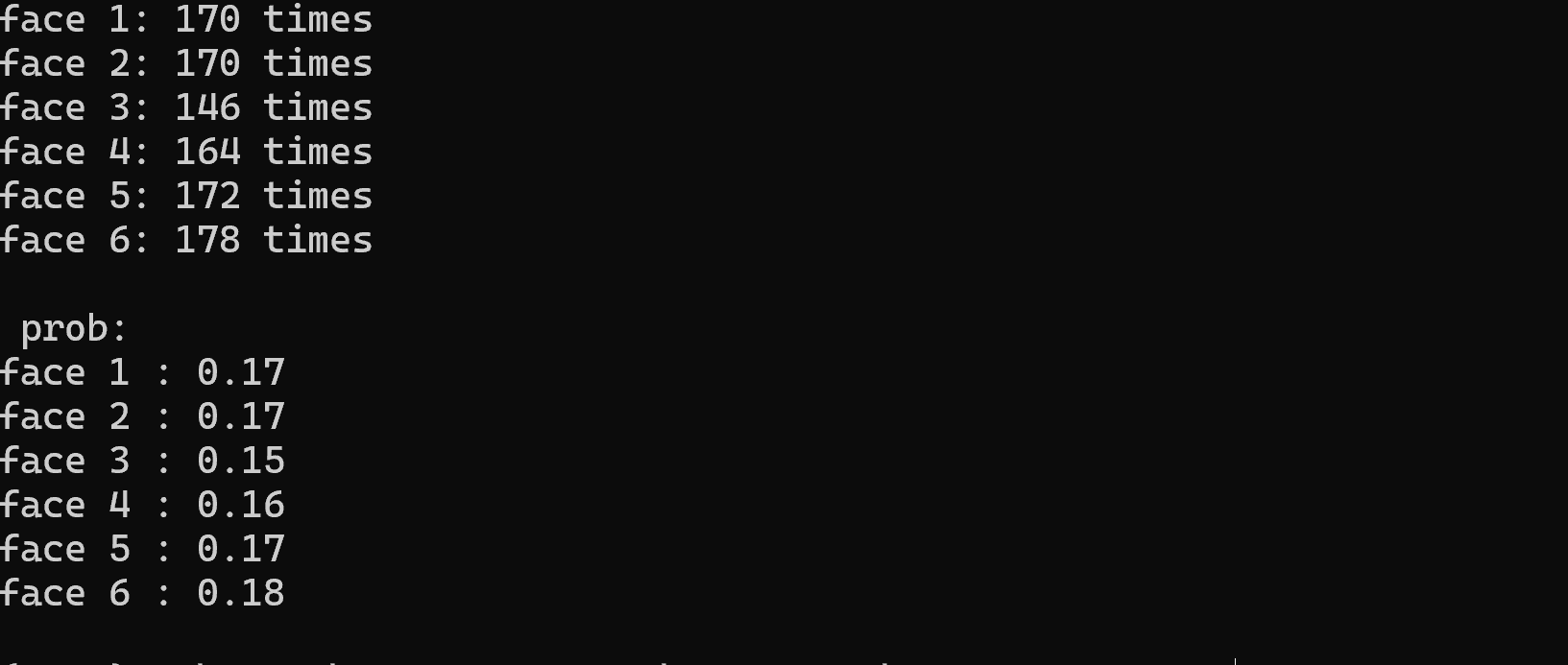
Yes, my dice is fair! ⚖️
And I felt like a mini data scientist 🧙♀️✨
🤓 What I Secretly Learned
Even though it looked like a game, I actually learned:
How random number generation works
How to analyze data frequency using NumPy
How to compute probabilities
How data scientists verify fairness or bias in systems
And most importantly —
I understood math without feeling sleepy. 😂
🧩 Step 5: Connecting It Back to DevOps
You might wonder —
“Hey Muni, what’s this got to do with DevOps?” 🤔
Actually, a lot!
Random data can be used to simulate server load or metrics.
Probability & statistics help detect anomalies in logs or CI/CD pipelines.
NumPy powers the AI models that can predict deployment failures or auto-scale intelligently.
So yes, my dice today might just evolve into an AI-powered DevOps monitoring tool someday 😎
🧭 Quick Recap: What I Learned Today
| Step | Concept | My Key Takeaway |
| 1 | Virtual Environment | Keeps experiments clean & safe |
| 2 | requirements.txt | My environment backup file |
| 3 | NumPy Arrays | The foundation of AI math |
| 4 | Vectorized Operations | Fast and elegant calculations |
| 5 | Dice Simulation | First data analysis experiment |
| 6 | DevOps Connection | How AI helps automate & predict systems |
💬 What’s Next?
Tomorrow, I’m going to meet Pandas 🐼 —
not the cute one from China,
but the one who loves Excel sheets and CSV files!
We’ll turn our dice data into a DataFrame, visualize it, and maybe… plot our first graph! 📈
✨ Thanks for reading!
If you’re also mixing DevOps and AI/ML, drop a comment —
Let’s grow together and make the future pipelines smarter! 💙
Stay curious. Stay kind. Stay automated.
— Muni 💫
About the author
"Aspiring DevOps Engineer on a 100-day journey to master the principles, tools, and practices of DevOps. Sharing daily insights, practical lessons, and hands-on projects to document my path from beginner to proficient. Passionate about continuous learning, automation, and bridging the gap between development and operations. Join me as I explore the world of DevOps, one day at a time!"
Comments
Join the discussionNo comments yet. Be the first to comment.
